FarmVille 3 Guide: What You're Actually Playing (and What Changes for UK Players)
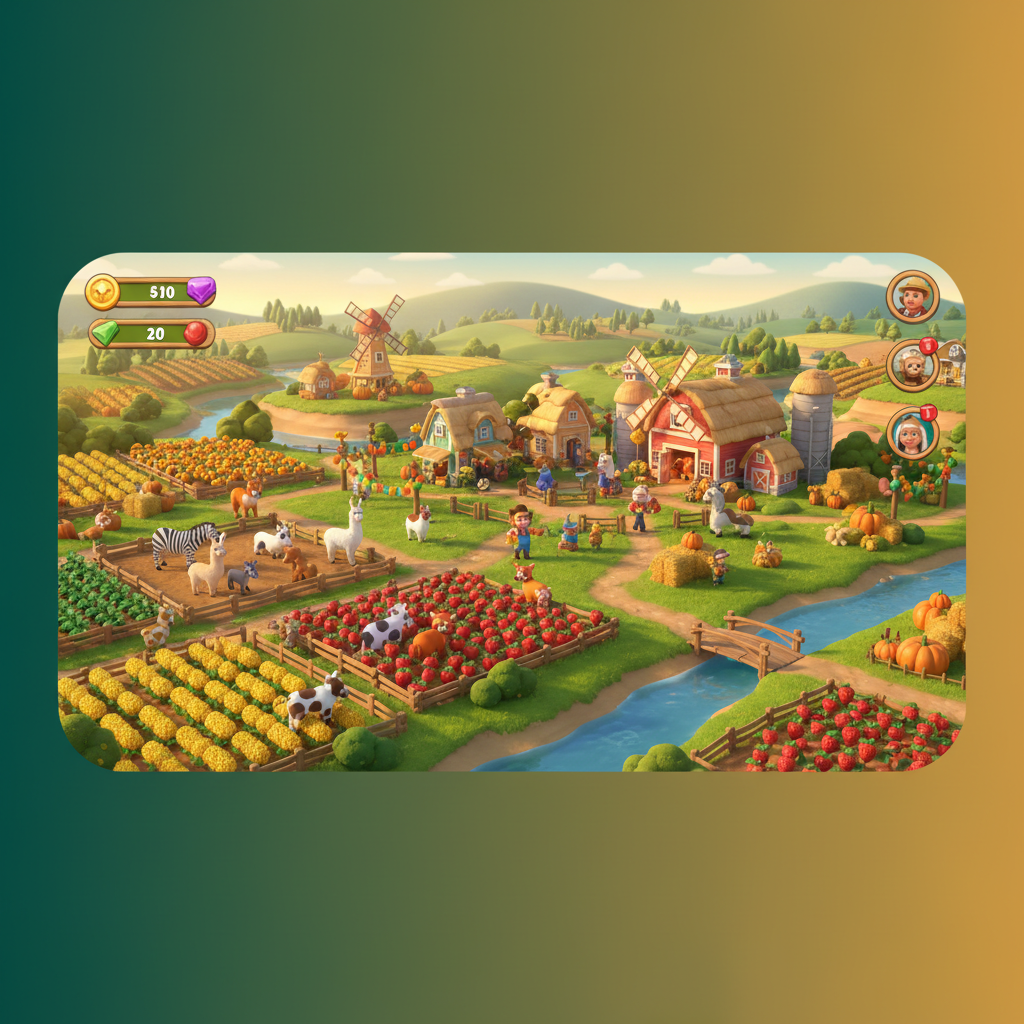
Here's what changes everything for UK players: FarmVille 3 is completely free, with no gambling mechanics, no UKGC licence requirement, and no age-gating beyond the standard App Store and Google Play policies. That means you can download it without identity checks, play without deposit limits, and never worry about affordability assessments starting from £150.00 a month. It's a farming game, not a casino title.
What you are getting is the deepest entry in Zynga's seventeen-year-old franchise. FarmVille 3 launched in November 2021 as a mobile-exclusive sequel that places animal breeding at the centre of progression. Unlocking new crop fields, recipes, and biomes all depends on acquiring rare animal breeds through a multi-step breeding system. This guide walks you through what that actually looks like on your screen, what the numbers mean, and where most new players go wrong in the first few days.
What You See on Screen: The Farm Interface Explained
When you first load FarmVille 3, the game drops you onto a small countryside plot with a handful of crops, one animal habitat, and an Orderboard on the left edge of the screen. That Orderboard is your primary progression mechanism. It lists delivery requests from NPCs: things like «3 loaves of bread» or «2 buckets of milk». Fulfilling those orders earns Farm Coins and experience points, which unlock new buildings, land expansions, and crop varieties.
The top-right corner shows your two currencies: Farm Coins (earned through play) and Farm Gems (the premium currency, purchasable with real money or earned in tiny amounts via events). Gems let you speed up timers, unlock extra crafting slots, and buy exclusive decorations. The entire core game can be completed without spending a penny, but if you want to progress faster or collect every cosmetic item, Gems are the shortcut.
Animal habitats sit in the centre of your farm. Tap one and you'll see the animals inside, along with a «Breed» button if you have two of the same species. Breeding takes several hours and delivers a baby animal via animated stork. Baby animals grow into adults after another timer, and rare breeds unlock new produce types unavailable from standard animals. That produce feeds into crafting chains: milk becomes cheese, eggs become cakes, wool becomes yarn.
Buildings like the bakery, dairy, and loom are where farmhands work. Each building has a named NPC assigned to it. Tap the building, queue a recipe, and your farmhand starts crafting. Completing tasks earns ribbons, which level up that farmhand and unlock faster crafting times, new recipes, and specialist boosts. Farmhands cannot be purchased and must be levelled through consistent play.
The weather van in the bottom-left corner shows today's forecast. Sunny weather accelerates crop growth, rain boosts water reserves, and special weather events unlock bonus resources. You can nudge the weather in your favour using the van, but it costs resources to do so. Checking the forecast daily and timing your planting accordingly rewards attentive players.
How a Round Works (Or Rather, How Your Day on the Farm Works)
FarmVille 3 doesn't have «rounds» in the way a casino crash game does. Instead, it operates on overlapping timers. Crops take 5 minutes to 8 hours to grow, depending on the variety. Animals produce resources every few hours. Crafting recipes take anywhere from 1 minute to 12 hours. The game is designed around appointment gaming: you check in, queue tasks, collect completed items, fulfil Orderboard requests, and queue the next batch.
- Log in and collect any completed crops, animal produce, and crafted goods
- Check the Orderboard and identify what items are needed for current requests
- Plant crops that feed into those items, or breed animals to unlock rare produce
- Queue recipes in your crafting buildings, using farmhands to speed things up
- Fulfil completed Orderboard requests to earn coins and experience
- Use coins to buy seeds, expand land, or upgrade buildings
- Check the event calendar and participate in any active seasonal events
- Visit co-op members' farms to collect bonus resources and trade surplus goods
If you're playing casually, two or three check-ins per day keeps you progressing at a steady pace. If you're aiming to complete a seasonal event or climb the County Fair leaderboard, expect to check in every few hours to keep crafting timers running efficiently. The game rewards planning and inventory management over reflexes or luck.
What the Numbers Mean: Stakes, Multipliers, and Payouts (Spoiler: There Aren't Any)
FarmVille 3 has no stakes, no multipliers, and no payouts in the gambling sense. The numbers you'll see are crop yields, crafting times, experience points, and event leaderboard scores. When a crop is ready to harvest, you tap it and collect the yield — for example, «3 wheat» or «5 tomatoes». Those go into your inventory, which has a limited capacity until you upgrade your storage barn.
Crafting recipes list input requirements and output quantities. A loaf of bread might need 2 wheat and take 5 minutes to bake. Fulfilling an Orderboard request that asks for 3 loaves earns you, say, 120 coins and 15 experience points. Those coins buy seeds and buildings. The experience points level you up, unlocking new crops, animals, and land expansions.
Seasonal events use milestone points. Completing daily tasks earns points, and hitting milestones (500 points, 1,000 points, 2,500 points) unlocks rewards like exclusive animals or decorations. Sky Races use a leaderboard system where purchasing themed items earns points, and finishing in the top tier rewards prestige decorations. The numbers are progression metrics, not gambling odds.
Where and How to Play in the UK: Platforms, Access, and What's Legal
FarmVille 3 is available on iOS (iPhone 8 or newer, iOS 14.0+) and Android (version 7.0 or higher, 2GB RAM minimum). Download it from the App Store or Google Play. Both stores allow the app in the UK without restriction because it's not a gambling product. You don't need a UKGC-licensed operator, there's no register to check, and no licence number in the footer.
You can play as a guest without any account, but guest play doesn't save to the cloud. If you uninstall or switch devices, you lose your farm. Link progress to a Facebook account, Zynga account, or Apple ID to enable cloud saves. There's no age verification beyond the App Store's standard age gate, no identity checks, and no document upload. You're not depositing money, so there's no affordability assessment at £150.00 net deposits a month, no £5.00 or £2.00 stake caps, and no GAMSTOP exclusion.
In-app purchases are optional. Gem packs range from a few pounds to larger bundles. Payment methods include debit cards (Visa, Mastercard), PayPal, Apple Pay, and Google Play credit. Credit cards are banned for gambling in the UK since 2020, but that restriction doesn't apply here because FarmVille 3 isn't a gambling product. The payment must still be in your own name, as with any App Store or Google Play purchase.
Demo vs Real Play: What Changes When You Spend Money
FarmVille 3 offers a browser-based demo on the farmville3.bet landing page, accessible without downloading the app. The demo lets you plant a few crops, collect animal produce, and queue a simple recipe. It's a five-minute taste of the core loop, not a full playthrough. The demo doesn't save progress, doesn't unlock events, and doesn't connect to co-ops.
The full free-to-play version, downloaded from the App Store or Google Play, includes every feature: all 150+ animal breeds, all farmhands, all seasonal events, co-op membership, and the complete crafting system. You can finish the entire game without spending money. What you cannot do without Gems is speed up long timers instantly, unlock extra crafting slots immediately, or acquire every exclusive decoration.
| Feature | Demo | Free Play | With Gems | |
|---|---|---|---|---|
| Animal Breeding | 1 species | All 150+ breeds | All 150+ breeds | → |
| Farmhands | None | All, via ribbons | All, via ribbons | → |
| Seasonal Events | No | Yes | Yes, premium tracks | → |
| Co-op Membership | No | Up to 30 players | Up to 30 players | → |
| Cloud Save | No | Yes (linked account) | Yes (linked account) | → |
| Crafting Timers | Instant | Real-time (1m–12h) | Can be skipped with Gems | → |
| Exclusive Decorations | None | Earnable via events | All via Gems or events | → |
Spending money accelerates progress and unlocks cosmetics. It doesn't change the core gameplay, doesn't improve your animals' output rates, and doesn't give you better Orderboard rewards. A player who spends £50.00 and a player who spends £0.00 will both reach the same endgame content. The paying player simply gets there faster and has a fancier-looking farm.
Common Mistakes in the First Few Days (and How to Avoid Them)
- Selling everything: early on, storage is tight and you'll be tempted to sell surplus crops for coins. Don't. Almost every crop feeds into a crafting recipe or Orderboard request later. Upgrade your barn first to increase storage capacity.
- Ignoring farmhands: new players often queue recipes without assigning a farmhand to the building. Farmhands reduce crafting times, unlock new recipes, and earn ribbons that improve efficiency. Always assign a farmhand and complete their tasks to level them up.
- Skipping the weather forecast: checking the daily weather and timing your planting accordingly can cut hours off crop growth. Sunny weather accelerates growth, so plant long-timer crops on sunny days and short-timer crops when rain is forecast.
- Spending Gems on small timers: Gems are rare if you're not buying them. Don't waste them skipping a 5-minute bread recipe. Save Gems for unlocking extra building slots, acquiring rare animals, or purchasing seasonal event premium tracks.
- Not joining a co-op: solo play is slower. Co-ops provide a steady supply of rare crafting materials via trade, group event rewards, and the County Fair leaderboard. Join an active co-op as soon as the feature unlocks at level 8.
- Breeding randomly: not every animal breed is useful at every stage. Focus on breeding animals that unlock produce needed for your current Orderboard requests and crafting chains. Breeding exotic animals for collection purposes can wait until you've established a stable coin income.
FAQ
Is FarmVille 3 gambling, and do I need a UKGC licence to play it?
No. FarmVille 3 is a farming simulation game with no gambling mechanics. There are no stakes, no uncertain outcomes tied to money, and no need for a UKGC remote licence. You download it from the App Store or Google Play like any other mobile game. The in-app purchases buy a known quantity of virtual currency (Gems), not a chance at a prize. UK gambling regulations, including the £5.00 and £2.00 stake caps, affordability checks from £150.00 a month, and GAMSTOP self-exclusion, do not apply.
Can I play FarmVille 3 for real money or win actual cash?
No. FarmVille 3 has no real-money payouts. You can spend real money to buy Farm Gems, which accelerate timers and unlock cosmetics, but you cannot convert in-game currency or items back into cash. There are no withdrawals, no e-wallet transfers, and no Faster Payments to your bank. Winnings are not tax-free because there are no winnings. It's a free-to-play mobile game, not a casino product.
How much does it cost to play FarmVille 3 properly?
Nothing, if you're patient. The entire game, including all animals, farmhands, crafting buildings, and seasonal events, can be completed without spending money. Premium purchases (Gem packs from £2.99 to £99.99) speed up timers and unlock exclusive decorations, but they don't gate essential gameplay. Most active players report spending £0.00 to £20.00 over several months, buying the occasional seasonal event premium track. If you treat it like a patient hobby rather than a race, you'll spend nothing.
What's the difference between FarmVille 3 and the original FarmVille?
The original FarmVille ran on Facebook from 2009 to 2020, built in Flash, and focused on crops. FarmVille 3 is mobile-exclusive, built from scratch in a modern engine, and centres animal breeding as the primary progression system. The original had appointment gaming (check in every few hours) but no farmhands, no weather system, and far fewer crafting chains. FarmVille 3 keeps the appointment loop but adds specialist NPCs, a dynamic forecast, over 150 animal breeds, and a packed seasonal event calendar. If you played the original at its 83-million-player peak in 2010, FarmVille 3 will feel familiar but vastly deeper.
Can I transfer my progress from FarmVille 2 to FarmVille 3?
No. FarmVille 3 is a separate game with no save-data import from earlier entries. You start from scratch with a small plot, one animal habitat, and basic crops. Some returning guide characters (like Marie) appear, but your FarmVille 2 farm, animals, and decorations do not carry over. If you've spent years building a FarmVille 2 farm, that progress stays in FarmVille 2. Think of FarmVille 3 as a fresh start, not a direct continuation.